ModeScheduler
An interactive CLI tool for managing action plans for OSA
Builds and manages a task plan for a selected repository. The plan can be:
- basic — a predefined set of tasks
- auto — generated by an AI model based on the repository contents
- advanced — adjusted by the user during CLI execution
The CLI allows user to:
- View the generated plan
- Confirm or cancel execution
- Edit the plan interactively
- Manage GitHub Actions workflows alongside other tasks
How it works?
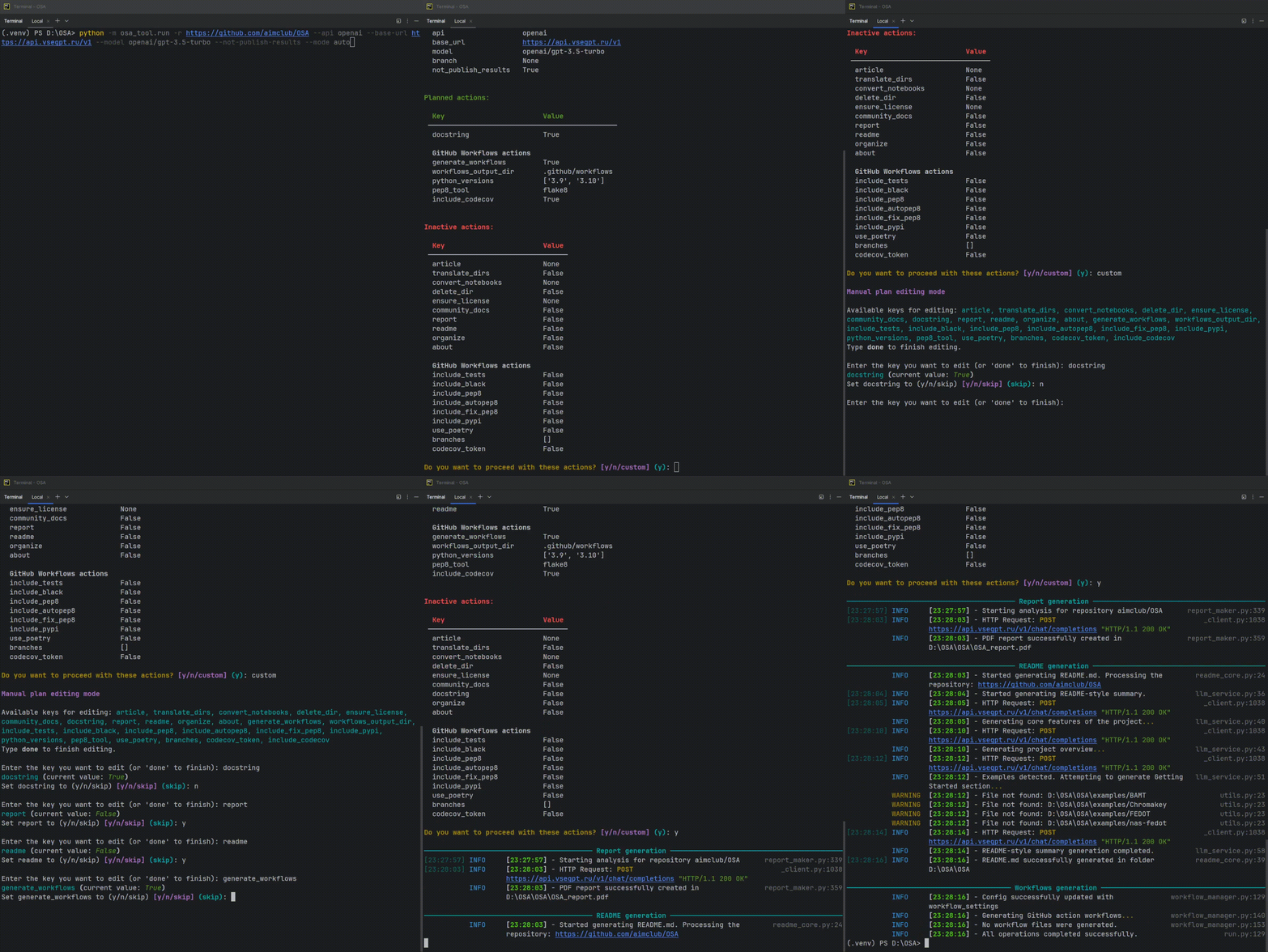
Here is a short demo:
Usage
Run Open-Source-Advisor using the following command:
python -m osa_tool.run -r {repository} [--mode {mode}] [--api {api}] [--base-url {base_url}] [--model {model_name}]
Required Argument
-r, --repository - URL of the repository to be analyzed and processed.
Available Modes
Before starting, the user needs to specify which mode they want to use:
| Mode | Description |
|---|---|
basic |
Runs a predefined set of actions: generates Report, README, Community docs, About section. Organize the repository structure by adding standard 'tests' and 'examples' directories if missing. |
auto (default) |
Automatically builds a plan using an AI model based on repository analysis. |
advanced |
Allows the user to manually select and configure which improvements and actions will be applied to the repository. |
What Happens Next
Once the CLI command is execute, OSA will:
- Analyze the repository
- Display informational tables in the console:
- Repository and environment info - general project details, active configuration
- Planned actions — a table listing actions and improvements that are scheduled to be applied.
- Inactive actions — a table showing actions that will not be applied based on the current plan.
Confirming the Action Plan
- Enter
yor simply press Enter — to accept the proposed plan and continue execution. - Enter
n— to cancel the operation. The program will immediately exit without making any changes - Enter
custom— to enter manual editing mode, where user can adjust the plan interactively.
Manual Plan Editing Mode
In custom mode:
- A list of editable actions is displayed.
- Available commands:
helpor?— displays a table with descriptions of all editable keys.multi-bool— enables batch editing of boolean-type keys.done— finishes the editing session and displays the current plan.- To edit an action, enter its name.
- For each selected action:
- If it is a boolean value (True/False), a prompt will request setting it to:
y— enablen— disableskip— leave unchanged
- If it is a string or list:
- A new value can be entered.
- Leave empty to skip.
- Enter
Noneto explicitly disable the value.
- Before entering a new value, the system will display:
- A short description.
- Allowed values (if available).
- An example (if available).
- The current value.
Once the user type done:
- The updated tables with planned actions and inactive actions will be displayed again.
- The program will prompt the user one more time to confirm the updated plan
- Available options:
- Confirm with
yor Enter - Cancel with
n - Re-enter manual editing mode with
custom
This interactive loop continues until the user explicitly confirms or cancels the operation.
This mode allows for precise control over which improvements, documentation, or workflow-related actions will be applied to the repository.
Table of Available Keys
The tables below are generated from the metadata used by the osa-tool command-line help. Edit osa_tool/config/settings/arguments.yaml, then run python docs/generate_cli_reference.py.
Task options
| Parameter | CLI options | Type | Required | Description | Choices |
|---|---|---|---|---|---|
about |
--about |
flag | — | Generate About section with tags. | — |
attachment |
--attachment |
str | — | Path to a local PDF file (for articles) or .docx file (for documents). Alternatively, accept a publicly accessible HTTP/HTTPS URL pointing to a PDF resource. |
— |
community_docs |
--community-docs |
flag | — | Generate community-related documentation files, such as Code of Conduct and Contributing guidelines. | — |
convert_notebooks |
--convert-notebooks |
list | — | Convert Jupyter notebooks from .ipynb to .py format. Provide one or multiple paths, or leave empty for repo directory. |
— |
docstring |
--docstring |
flag | — | Automatically generate docstrings for all Python files in the repository. | — |
ensure_license |
--ensure-license |
str | — | Enable LICENSE file compilation. | bsd-3, mit, ap2 |
ignore_list |
--ignore-list |
list | — | Space-separated list of the directories and boilerplate files to be ignored while docstring generation. Directories should be listed relatively to the project root. If flag omitted only init.py will be ignored. |
— |
incremental |
--incremental |
flag | — | Enable incremental mode for tasks (e.g., generate docstrings only for missing ones and skip main idea update). | — |
notebook_report |
--notebook-report |
list | — | Analyze Jupyter notebooks and generate a notebook PDF report. Provide one or multiple paths, or leave empty for repo directory. |
— |
organize |
--organize |
flag | — | Organize the repository structure by adding standard 'tests' and 'examples' directories if missing. | — |
paper_analysis |
--paper-analysis |
flag | — | Run the analysis-only paper claim and repository verification pipeline. | — |
readme |
--readme |
flag | — | Generate a README.md file based on repository content and metadata. | — |
refine_readme |
--refine-readme |
flag | — | Enable advanced README refinement. This process requires a powerful LLM model (such as GPT-4 or equivalent) for optimal results. | — |
report |
--report |
flag | — | Analyze the repository and generate a PDF report with project insights. | — |
requirements |
--requirements |
flag | — | Generate or refine a requirements.txt file based on repository content. | — |
scorecard |
--scorecard |
flag | — | Run OpenSSF Scorecard analysis and include the results in the PDF reports. | — |
skip_health_check |
--skip-health-check |
flag | — | Skip pre/post reorganization health checks. | — |
target_files |
--target-files |
list | — | Space-separated list of specific files to analyze. If set, OSA will focus only on these files. | — |
translate_dirs |
--translate-dirs |
flag | — | Enable automatic translation of the directory name into English. | — |
translate_readme |
--translate-readme |
list | — | List of target languages to translate the project's main README into. Each language should be specified by its name (e.g., "Russian", "Chinese"). The translated README files will be saved separately in the repository folder with language-specific suffixes (e.g., README_ru.md, README_zh.md). |
— |
Repository and model settings
| Parameter | CLI options | Type | Required | Description | Choices |
|---|---|---|---|---|---|
api |
--api |
str | — | LLM API service provider | host, itmo, openai, ollama |
artefacts_language |
--artefacts-language |
str | — | Generate reports on selected language | — |
author |
--author |
str | — | Primarily used for web interface. When set, the tool will add Author to the Pull Request body. | — |
base_url |
--base-url |
str | — | URL of the service provider. See: https://github.com/aimclub/ProtoLLM/tree/main/protollm/connectors |
— |
based_on_date |
--based-on-date |
str | — | Date the repository has to be analysed as of, for example the publication date of a related article. The repository is rolled back to the commit closest to this date. WARNING: fork and pull request creation (--no-fork, --no-pull-request) are forced for such runs, since the analysed tree is outdated. Accepted formats: YYYY-MM-DD, YYYY-MM-DDThh:mm:ss, DD.MM.YYYY. |
— |
branch |
-b--branch |
str | — | Branch name of the GitHub repository | — |
config_file |
--config-file |
str | — | Path to custom configuration file (TOML format). | — |
context_window |
--context-window |
int | — | Total number of model context (Input + Output). | — |
delete_dir |
--delete-dir |
flag | — | Enable deleting the downloaded repository after processing. | — |
max_retries |
--max-retries |
int | — | Maximum retry attempts for LLM API calls | — |
max_tokens |
--max-tokens |
int | — | Maximum number of output tokens the model can generate in a single response. | — |
mode |
-m--mode |
str | — | Select the operation mode for repository processing: basic — run a minimal predefined set of tasks. auto (default) — automatically determine necessary actions based on repository analysis. advanced — run all enabled features based on provided flags. |
basic, auto, advanced |
model |
--model |
str | — | Specific LLM model to use. See available providers and models: https://github.com/aimclub/ProtoLLM/tree/main/protollm/connectors |
— |
model_docstring |
--model-docstring |
str | — | Specific LLM model for docstring generation tasks. | — |
model_general |
--model-general |
str | — | Specific LLM model for general tasks such as About section generation or reorganization. | — |
model_paper_claims |
--model-paper-claims |
str | — | Specific LLM model for typed paper claim extraction. | — |
model_paper_verification |
--model-paper-verification |
str | — | Specific LLM model for paper claim verification. | — |
model_readme |
--model-readme |
str | — | Specific LLM model for README generation tasks. | — |
model_repository_quality |
--model-repository-quality |
str | — | Specific LLM model for formal repository-quality scoring. | — |
no_fork |
--no-fork |
flag | — | Do not create a public fork to the target repository. | — |
no_pull_request |
--no-pull-request |
flag | — | Do not create a pull request to the target repository. | — |
output |
-o--output |
str | — | Path to the output directory | — |
repository |
-r--repository |
str | yes | URL of the GitHub repository | — |
temperature |
--temperature |
float | — | Sampling temperature to use for the LLM output (0 = deterministic, 1 = creative). | — |
top_p |
--top-p |
float | — | Nucleus sampling probability (1.0 = all tokens considered). | — |
use_single_model |
--use-single-model |
flag | — | Use the same model for all tasks (from default configuration). | — |
web_mode |
--web-mode |
flag | — | Enable web interface mode. When set, the tool will generate the task plan without launching the interactive CLI editor. |
— |
Workflow options
| Parameter | CLI options | Type | Required | Description | Choices |
|---|---|---|---|---|---|
branches |
--branches |
list | — | Branches to trigger the workflows on. | — |
codecov_token |
--codecov-token |
flag | — | Use Codecov token for uploading coverage. | — |
generate_workflows |
--generate-workflows |
flag | — | Generate workflows for the repository. | — |
include_autopep8 |
--include-autopep8 |
flag | — | Include autopep8 formatter workflow. | — |
include_black |
--include-black |
flag | — | Include Black formatter workflow. | — |
include_codecov |
--include-codecov |
flag | — | Include Codecov coverage step in a unit tests workflow. | — |
include_fix_pep8 |
--include-fix-pep8 |
flag | — | Include fix-pep8 command workflow. | — |
include_pep8 |
--include-pep8 |
flag | — | Include PEP 8 compliance workflow. | — |
include_pypi |
--include-pypi |
flag | — | Include PyPI publish workflow. | — |
include_ruff |
--include-ruff |
flag | — | Include Ruff linter and formatter workflow. | — |
include_tests |
--include-tests |
flag | — | Include unit tests workflow. | — |
pep8_tool |
--pep8-tool |
str | — | Tool to use for PEP 8 checking. | flake8, pylint |
python_versions |
--python-versions |
list | — | Python versions to test against. | — |
use_poetry |
--use-poetry |
flag | — | Use Poetry for packaging. | — |
use_uv |
--use-uv |
flag | — | Use uv instead of pip for dependency installation in workflows. | — |
Paper-analysis options
| Parameter | CLI options | Type | Required | Description | Choices |
|---|---|---|---|---|---|
claims_json |
--claims-json |
path | — | Typed, legacy, or bare claim JSON to verify. | — |
force_parser_refresh |
--force-parser-refresh--force-marker-refresh |
flag | — | Ignore cached PDF parser output for this run; claim extraction still runs normally. | — |
hide_low_confidence |
--hide-low-confidence |
flag | — | Hide low-confidence verification results from the reported rate. | — |
include_low_confidence |
--include-low-confidence |
flag | — | Keep low-confidence verification results in the report and rate. | — |
include_low_verifiability |
--include-low-verifiability |
flag | — | Also verify low or missing-verifiability claims. | — |
include_repository_quality |
--include-repository-quality |
flag | — | Calculate and export the formal 0-100 repository-quality score. | — |
only_high_medium_verifiability |
--only-high-medium-verifiability |
flag | — | Verify only high- and medium-verifiability claims. | — |
paper |
--paper |
path | — | PDF paper to extract through typed paper_claims. | — |
paper_claims_prompts_dir |
--paper-claims-prompts-dir |
path | — | Directory of TOML prompt overrides for paper-claim extraction. | — |
paper_output_dir |
--paper-output-dir |
path | — | Directory for paper-analysis artifacts. Configured defaults use a collision-safe clone-name namespace outside the repository; paths inside the analyzed repository are rejected. | — |
pdf_parser |
--pdf-parser |
str | — | PDF parser for --paper. Defaults to the [paper_analysis.paper_claims] configuration. | mistral-ocr, cloudflare-ai, marker |
sections_json |
--sections-json |
path | — | Parsed PaperSection JSON to extract and verify. | — |
skip_repository_quality |
--skip-repository-quality |
flag | — | Skip formal repository-quality scoring for this run. | — |
Note: Enabling both --include-ruff and --include-black generates CI jobs that may produce conflicting formatting results, since Ruff's formatter and Black apply different style rules. Prefer one formatter per project.
OSA chooses the workflow output path from the repository platform; the current CLI does not provide a
--workflows-output-dir option. GitHub workflows go under .github/workflows, GitLab uses .gitlab-ci.yml at the
repository root, and other supported platforms use their configured workflow locations.